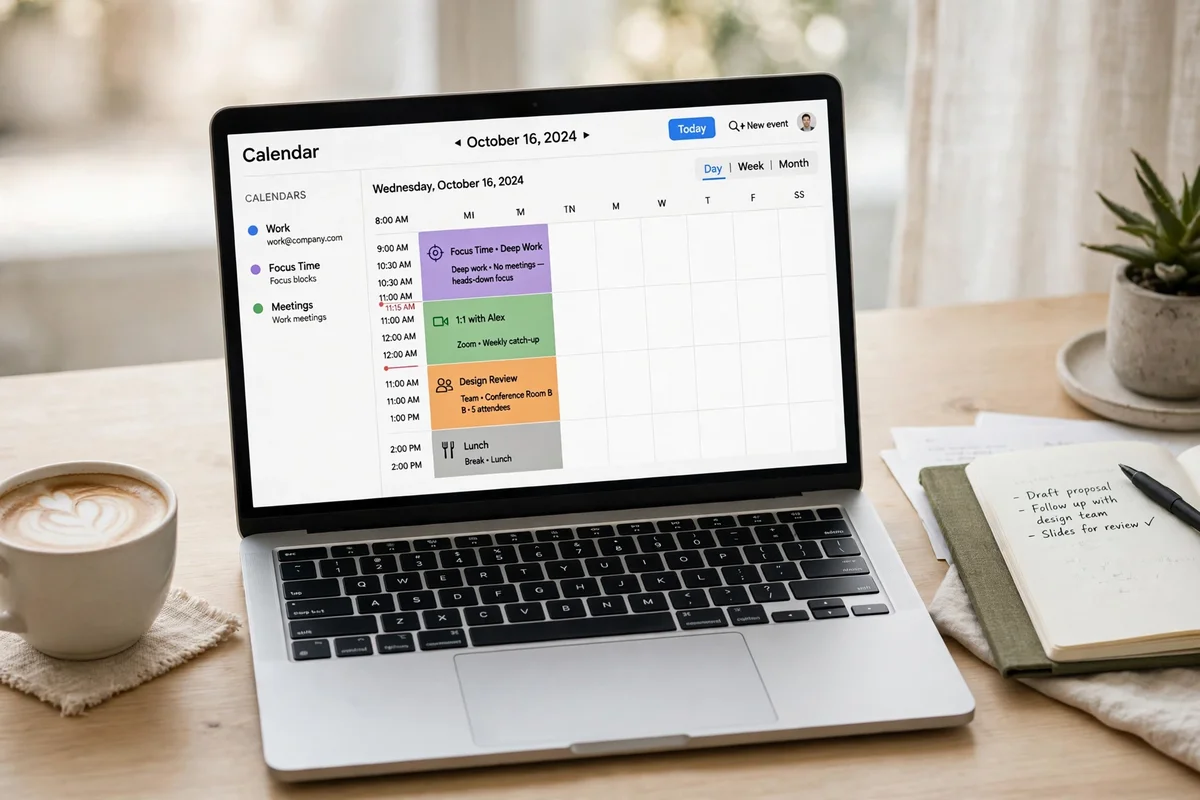
Reclaim AI is an AI calendar assistant that automatically schedules your focus time, habits, tasks and meetings around each other. Instead of you dragging blocks around by hand, Reclaim watches your calendar and finds the best open slot for every piece of work, then moves things around when your week changes.
It works on top of the calendar you already use, Google Calendar or Microsoft Outlook, rather than replacing it. You connect your calendar, tell Reclaim what matters to you, and it defends that time against the meetings that would otherwise eat it.
Reclaim is owned by Dropbox, which acquired the Portland startup in August 2024. The product has kept running as a separate service since then, with its own pricing and plans, and a free Lite plan that makes it easy to try. This guide explains what Reclaim AI is, how it works, what it costs, and who it suits best.
What Is Reclaim AI?
Reclaim AI is best described as a smart scheduling layer for your calendar. It does not ask you to learn a new calendar app. Instead, it connects to Google Calendar or Outlook and adds intelligent automation on top: it books time for deep work, protects recurring routines, and reschedules meetings to the best available slot.
The core idea is simple. Most calendars only record what you have already agreed to. They do nothing to protect the work that has no meeting attached to it. Focus time, lunch and preparation all get squeezed out by other people’s invitations, because a calendar treats an empty slot as free time. Reclaim flips that around: you give it standing goals, such as ten hours of focus time a week or a daily lunch break, and it finds room for them. When a new meeting lands on top of a focus block, Reclaim moves the block instead of letting it disappear.
The product was founded in 2019 in Portland, Oregon, by Patrick Lightbody and Henry Shapiro, two former New Relic colleagues. By the time Dropbox acquired it in August 2024, more than 320,000 people across 43,000 companies were using it, and the startup had raised over $9.5 million. Dropbox never disclosed the price, although some reports put it at around $40 million. The whole 22-person team joined Dropbox, and both founders stayed with the product.
How Reclaim AI Works
Getting started with Reclaim AI takes a few minutes. You sign up, connect your Google or Outlook calendar, and set your working hours. Reclaim then asks about your priorities: how much focus time you want each week, which habits you want to protect, and which tasks need scheduling.
From there, Reclaim runs in the background as a set of AI agents. Each agent has one job: the Focus Time agent books blocks of deep work, the Habits agent schedules recurring routines such as lunch, the Smart Meetings agent finds the best time for recurring meetings, and Buffers add short breaks after calls.
Every agent gets a priority, from Critical down to Low, which decides what gives way first when the calendar gets crowded. A critical focus block will push a low-priority habit aside, but not the other way round. This is how Reclaim keeps your most important time safe without you defending it yourself.
Reclaim also syncs tasks from the tools you already use, including Todoist, Asana, ClickUp, Jira, Linear and Google Tasks. In the current version of the product, known as Reclaim 2.0, tasks are suggested during your focus time rather than each getting its own dedicated calendar block, and a built-in timer logs the time you spend on a task once you start it. Nothing is written to your calendar, and no notifications go to meeting attendees, until you click Apply, so you stay in control of the final schedule.
Key Features of Reclaim AI
Reclaim’s features all serve the same goal: protecting time for the work that matters. Here are the main ones.
Focus Time
Focus Time is the feature most people sign up for. You set a weekly goal, for example eight or ten hours of uninterrupted work, and Reclaim books blocks for it around your meetings. The blocks flex automatically: if a meeting is added over a focus block, Reclaim moves the block to the next free slot. You can also let it auto-decline meetings that clash with protected focus time.
Habits
Habits are flexible recurring events: lunch between 11:30 and 14:00, a morning workout, or a Friday review session. You give each habit a time window and a minimum length, and Reclaim finds the best slot each day. If the day gets tight, a habit can shrink to its minimum length instead of vanishing entirely.
Smart Meetings
Smart Meetings handle recurring one-to-ones and team meetings. Instead of fixing them to a rigid slot, Reclaim finds the time that works best for everyone and moves the meeting automatically when a conflict appears. This is especially useful for teams spread across time zones.
Buffer Time
Buffers add short breaks after meetings, usually 15 minutes, so you are not jumping straight from one video call into the next. It is a small feature with an outsized effect on how draining a meeting-heavy day feels.
Scheduling Links and Calendar Sync
Reclaim includes booking links, similar to Calendly, that let other people book time with you. The links adapt as your calendar changes, so they only offer genuinely free slots. The free Lite plan includes one scheduling link, while paid plans add more.
Calendar Sync mirrors your busy time between work and personal calendars, so a personal appointment blocks your work calendar and vice versa. Reclaim also connects with Slack, Zoom and Google Meet, and the higher plans add webhooks for connecting to other tools. A chat-based AI assistant lets you ask for things in plain language, such as finding two hours for a project this week.
Reclaim AI Pricing and Plans
Reclaim AI pricing is straightforward, with one free plan and three paid tiers, all priced per seat per month in US dollars. Prices below were listed on Reclaim’s pricing page in November 2026, so check the current page before buying.
Lite is free forever for one user. It includes five AI agents, a one-week scheduling range, one calendar sync and one scheduling link. It is genuinely usable, not a short trial, but the one-week range limits how far ahead it can plan.
Starter costs $10 per seat per month on annual billing, or $12 on monthly billing. It is designed for teams of up to ten seats, with ten agents per seat, an eight-week scheduling range, three calendar syncs and three scheduling links, plus the full set of task integrations.
Business costs $15 per seat per month billed annually, or $18 monthly. It covers up to 100 seats and adds 100 agents per seat, a 12-week range, unlimited syncs and links, webhooks, a team out-of-office calendar, and delegated access for executive assistants.
Enterprise costs $22 per seat per month on annual billing only, for organisations with more than 100 seats. It adds single sign-on and SCIM provisioning, org-chart-aware scheduling and dedicated support.
Every new account also gets a 14-day trial of the Business plan at signup, with no credit card required, which is the easiest way to test the full feature set before deciding.
Pros and Cons of Reclaim AI
Like any tool, Reclaim AI has strengths and limits. Here is an honest summary.
The biggest strength is the free plan. Reclaim is one of the few AI scheduling tools with a permanent free tier, so you can test the core idea, defending focus time, without paying anything. The paid plans are also cheap compared with rivals, starting at $10 per seat a month, and it works with the calendar you already have.
On the downside, Reclaim only works with Google Calendar and Outlook. If your calendar is Apple iCloud or anything else, it will not work for you. Reviewers also note that there is no native mobile app, so if you run your day from your phone, that is a real gap. Outlook users also give up a few small things that Google users get, such as cleaner handling of meeting updates when a Smart Meeting moves.
Reclaim 2.0 changed how tasks work, and some long-time users were unhappy about it. Tasks no longer get their own dedicated calendar blocks automatically, so if you want AI to plan every task and project for you, a tool built around task management will fit better. Finally, Reclaim writes events directly onto your main calendar. That is how it works, but if you dislike the idea of an app adding events to your calendar, it will not suit you.
Who Is Reclaim AI For?
Reclaim AI suits anyone whose calendar is crowded with other people’s meetings. If you regularly end the week having done no deep work because meetings filled every gap, Reclaim is built for you. It works well for managers, engineers, writers, sales staff and executive assistants juggling several calendars at once, and for remote workers who want a boundary between work and personal time.
It is less useful if your calendar is light. With only a few meetings a week, a plain calendar and a to-do list will do the same job for free. It is also not a full task manager or project tool, so if that is what you need, look at the alternatives below instead.
Reclaim is one of a growing wave of AI-powered online tools changing how people work, from AI search analytics to network utilities that remote workers rely on every day. Keeping up with tech education trends helps you spot which tools are worth your time.
Reclaim AI Alternatives
The main alternative is Motion, an all-in-one workspace that combines tasks, projects, docs and calendar in a single app. Motion is stronger if you work from a task list with hard deadlines and want every task placed in a real slot. It costs more and has no free tier.
Calendly and Cal.com are booking tools, not auto-schedulers. They are excellent if your only problem is arranging meetings, but they will not defend your focus time or schedule your habits. Cal.com has a free tier for one user, while Calendly’s paid plans start at a similar price to Reclaim’s Starter.
One name you will see in older comparisons is Clockwise, once the default recommendation in this category. Clockwise shut down in March 2026 after its team joined Salesforce, and it pointed its departing users to Reclaim as the closest replacement.
Frequently Asked Questions
What is Reclaim AI used for?
Reclaim AI automatically schedules and protects focus time, habits, tasks, breaks and meetings on Google Calendar or Outlook. It finds the best slot for each block and moves things around when your week changes, so deep work does not get squeezed out by meetings.
Is Reclaim AI free?
Yes. Reclaim AI has a free Lite plan for one user, with five AI agents, a one-week scheduling range, one calendar sync and one scheduling link. Paid plans start at $10 per seat per month on annual billing. Every new account also gets a 14-day trial of the Business plan.
Who owns Reclaim AI?
Reclaim AI is owned by Dropbox, which acquired it in August 2024. TechCrunch reported the acquisition, noting that the whole 22-person team joined Dropbox and both founders stayed with the product. Reclaim continues to operate as a separate product with its own pricing.
Does Reclaim AI work with Outlook?
Yes. Reclaim AI works with Google Calendar and Microsoft Outlook. Outlook support launched in beta in May 2025 and is now fully supported, although a few small features work more smoothly on Google Calendar.
Does Reclaim AI have a mobile app?
Reviewers note that Reclaim has no native mobile app. You manage it through the web app, and the events it creates appear in your normal calendar app on your phone. If you run your day mainly from your phone, this is worth knowing before you sign up.
What is the difference between Reclaim AI and Motion?
Reclaim AI is built to defend recurring time, such as focus blocks, habits and buffers, on a calendar you already use. Motion is an all-in-one workspace that places deadline-driven tasks into calendar slots alongside projects and docs. Choose Reclaim to protect your time, and Motion if you want tasks and projects managed in one place.
Is Reclaim AI safe to connect to my calendar?
Reclaim needs access to your calendar to do its job, which means trusting it with your schedule. It is owned by Dropbox, a large public company, and in Reclaim 2.0 nothing is written to your calendar until you approve it. As with any calendar tool, read its privacy policy and security page before connecting a work calendar.