Granola AI is an AI-powered meeting notepad that listens to your meetings through your own computer and turns them into clean, structured notes. Unlike most AI note takers, it never joins your call as a visible bot. There is no extra participant in the meeting list and no recording banner, so calls stay natural and human.
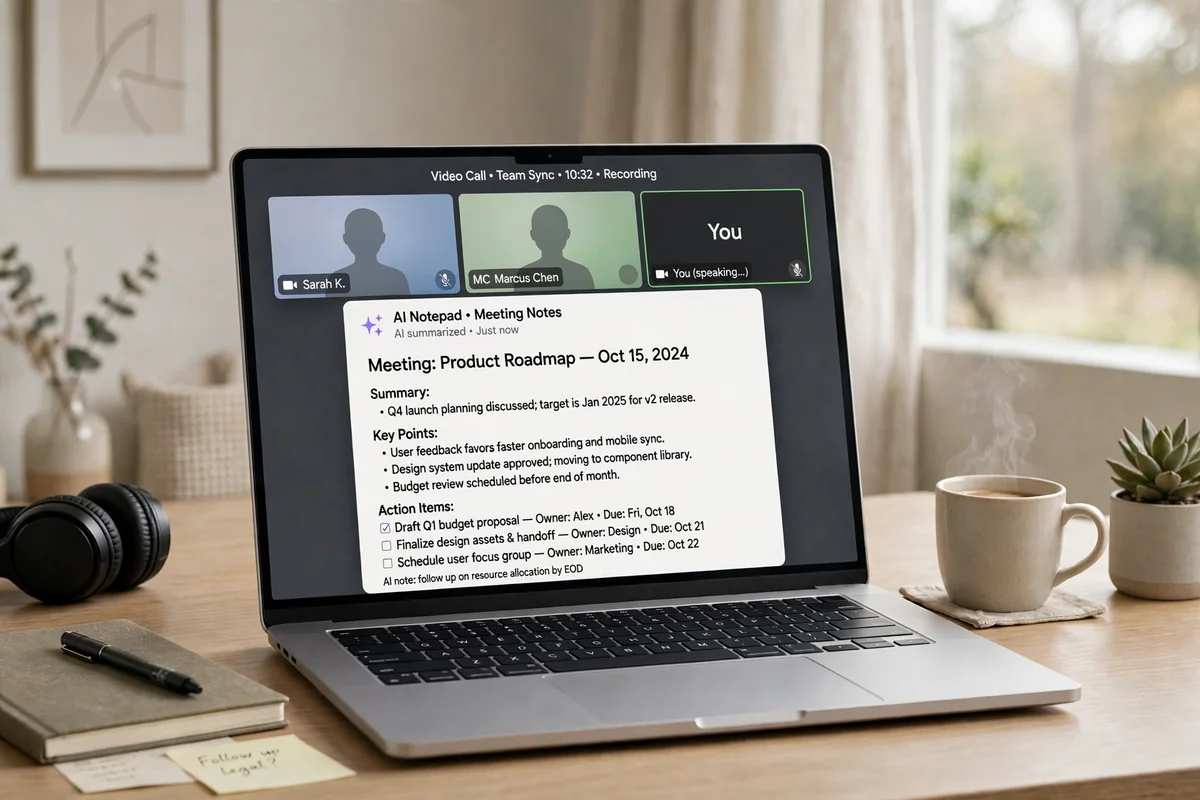
Instead, Granola captures the audio your device is already playing, transcribes it in real time, and combines that transcript with whatever rough notes you type, producing polished minutes, decisions and action items.
The idea has struck a chord. Granola was founded in London in March 2023 by Chris Pedregal and Sam Stephenson, launched publicly in May 2024, and became one of the UK’s newest unicorns in March 2026, when it raised a $125 million Series C at a $1.5 billion valuation, taking its total funding to $192 million.
What Is Granola AI Used For?
Granola AI takes meeting notes for you. Open the app, start a session, and type only the points that matter to you, or nothing at all. Granola fills in the rest from the live transcript, producing an editable summary after the call.
It is aimed squarely at people who live in back-to-back meetings: founders, managers, salespeople, consultants, recruiters and researchers. The core promise is attention: you stop splitting your focus between listening and typing, because the tool keeps the record while you stay present.
Granola is best described as a notepad rather than a recorder. It never saves audio or video. What it keeps is the transcript and the notes it generates from it, which you can search, share and ask questions about later. That makes it a searchable memory for your working week: decisions, commitments and context from every call, in one place.
How Does Granola AI Work?
Granola works by capturing your device’s own audio, which is the feature that sets it apart. Most AI note takers join a video call as a bot participant and record the meeting from inside it. Granola instead listens to the sound your computer plays through its speakers or headphones, plus your microphone, and transcribes that stream in real time. Because no bot joins the call, it works across Zoom, Google Meet, Microsoft Teams and any other platform that plays audio on your machine, and the mobile apps can capture in-person conversations too.
The workflow is deliberately simple. You start a new session in the desktop app when a meeting begins. A live transcript appears in a panel while you type rough notes in a clean, Notion-style editor. When the session ends, Granola merges your notes with the transcript and calendar context to produce enhanced notes: a structured summary with headings, decisions and follow-ups. Your own notes shape the result. If you type “pricing objection” during a sales call, Granola expands it with the relevant detail from the transcript.
A chat feature, known as Ask Granola, lets you question your notes afterwards: what was decided, what the action items were, or how a topic has come up across several meetings, with answers quoted from the transcript. Granola also offers a personal and enterprise API, plus a Model Context Protocol (MCP) server, so meeting context can flow into other AI tools.
Granola AI Features
Bot-free transcription is the headline feature. Granola captures system and microphone audio on your device after you start a note, with no bot joining the meeting and no recording banner for other participants.
AI-enhanced notes turn rough jottings into structured summaries. The app preserves what you typed and adds context from the transcript, so the finished notes reflect your judgement rather than a generic auto-summary. Notes stay editable, so you can fix names and add your own thoughts. Granola Chat then lets you search across your meeting history in plain language, getting answers drawn from past calls instead of scrolling through old notes.
The Business plan adds native sync with Zapier, Slack, Notion, HubSpot, Attio and Affinity, plus automatic Gmail follow-up drafts. The Enterprise plan adds Salesforce.
Multi-language support and mobile apps round out the package. Granola runs on macOS and Windows desktops, with iOS and Android apps and an Apple Watch companion for capturing conversations away from your desk.
Granola AI Pricing
Granola AI pricing has three tiers, checked against the company’s pricing page in November 2026. Prices can change, so always confirm the current figures before you buy.
The Basic plan is free and includes AI meeting notes, chat, shared folders, templates and multi-language support. Its main limit is history: the free plan keeps only 30 days of meeting history, so older notes are hidden until you upgrade.
The Business plan costs $14 per user per month, billed monthly. It restores unlimited meeting history and adds automatic Gmail follow-up drafts, plus the Notion, HubSpot, Slack and Zapier integrations and API access. For most individuals and small teams, this is the plan that makes sense.
The Enterprise plan costs $35 per user per month and adds organisation-level controls, single sign-on (SSO), the enterprise API, Salesforce integration and a HIPAA business associate agreement (BAA) for the desktop app. It is aimed at larger companies with compliance and security requirements.
Granola AI Pros and Cons
The biggest pro is the bot-free experience. Calls stay clean and human, with no extra participant and no recording announcement. For client calls, board meetings and sensitive conversations, that matters.
The second pro is the quality of the notes. Because Granola blends your own rough notes with the transcript, the output reads like notes you wrote yourself, only more complete. Templates and the chat feature make the notes genuinely useful after the meeting.
The third pro is simplicity. Install the desktop app, start a session, and it works on any platform that plays audio through your computer, with no per-platform bot permissions to manage.
On the other side, Granola does not record audio or video at all. That is a privacy feature, but it also means you cannot play back a call to check what was actually said. If the transcript mishears a name or a number, there is no recording to verify it against. It also cannot import pre-recorded audio or video files. Granola only transcribes live audio, so you cannot feed it an old recording or a voice memo and get notes from it.
Finally, the free plan’s 30-day history limit is tight for anyone who wants a long-term record of their meetings, and the desktop app is required for video calls.
Privacy, Consent and the Granola Lawsuit
Granola’s bot-free design is its main selling point and its main controversy. The same invisibility that makes calls feel natural also means other participants may not know their words are being transcribed.
On the technical side, Granola says it never records or stores audio or video, and it reports holding a SOC 2 Type II report. But on the Free and Business plans, Granola uses de-identified data from meetings to train its own models by default, unless you opt out in settings.
The legal side is unresolved. In July 2026, a proposed class action called Chamberlain v. Granola, Inc. was filed in a California federal court, alleging that Granola’s silent capture records people without their consent and that it uses captured conversations for AI model training by default. These are allegations only: no court has found that Granola broke the law, and the case was still at an early stage at the time of writing. Similar cases have also been filed against Otter.ai and Fireflies.ai.
The practical advice is simple whatever tool you use. Tell people at the start of a call that you are taking AI notes, and check the recording consent rules where you and your participants are based. Some places, including California and around a dozen other US states, require everyone on a call to consent.
Who Is Granola AI For?
Granola fits individuals and small teams who live in meetings and want fast, clean notes without managing a bot. Founders and executives use it to track decisions across a packed calendar. Salespeople use it to capture discovery calls and draft follow-ups. Consultants, recruiters and researchers use it to document conversations and keep interview notes searchable.
It is less suited to teams that need a verifiable recording of every call, or deep meeting analytics such as speaker talk-time stats and coaching insights. Tools such as Gong or Read AI are built for that.
If you are comparing AI tools more broadly, Granola sits in a growing family of focused AI products that do one job well. Our guide to Ziptie AI search analytics covers another specialist AI tool, for tracking how your site appears in AI search results. And our ip2-online guide explains a handy utility for checking network and IP details.
Granola AI vs Alternatives
Otter.ai is the best-known rival. It joins calls as a bot, offers real-time transcription and a generous free tier, and is strong on collaboration. Choose Otter if you want visible, team-wide transcription and do not mind the bot. Choose Granola if the bot itself is the problem. Fireflies.ai is the power user’s choice, with deep integrations, conversation analytics and support for uploading recorded files. Choose Fireflies if you need analytics and CRM workflows. Choose Granola if you want simpler, cleaner notes.
Fathom is popular with sales teams for its free tier, video highlights and CRM sync. It records video as well as audio, which Granola deliberately does not. Choose Fathom if you want to clip and share moments from calls. Notta and tl;dv are strong budget options with bots, transcription and summaries. Granola’s edge remains the same in every comparison: no bot, no recording, and notes shaped by your own input.
Frequently Asked Questions
What is Granola AI?
Granola AI is an AI meeting notepad that transcribes the audio playing on your device, combines the transcript with the rough notes you type, and produces clean, editable summaries with decisions and action items. It never joins your call as a bot.
Does Granola AI join meetings as a bot?
No. Granola runs on your computer or phone and captures audio after you start a note. It adds no participant to the call, so other attendees see no bot.
Is Granola AI free?
Yes. The free Basic plan includes AI meeting notes, chat, templates and multi-language support, with 30 days of meeting history. Business costs $14 per user per month and Enterprise $35.
Does Granola AI record audio or video?
No. Granola transcribes audio in real time and keeps only the transcript and the notes generated from it, so you cannot play back a call afterwards.
Is Granola AI safe to use?
Granola reports SOC 2 Type II compliance and keeps no audio recordings, which is a strong starting point. However, on the Free and Business plans it uses de-identified meeting data to train its models by default unless you opt out, and a proposed class action filed in July 2026 alleges its silent capture breaches consent laws. Those claims are unproven, but always tell participants you are taking AI notes.
What platforms does Granola AI work on?
Granola runs on macOS and Windows, with iOS and Android apps and an Apple Watch companion. It works with Zoom, Google Meet, Teams and any platform that plays audio through your device.
What is the best Granola AI alternative?
Otter.ai is the best all-rounder, Fireflies.ai is best for analytics and integrations, Fathom is best for sales teams that want video clips, and Notta is a strong budget option. None of them match Granola’s bot-free approach.
Granola AI is a focused tool with a clear idea: meetings should feel human, and notes should write themselves. If you are tired of bots in your calls, the free Basic plan is an easy way to try it.